


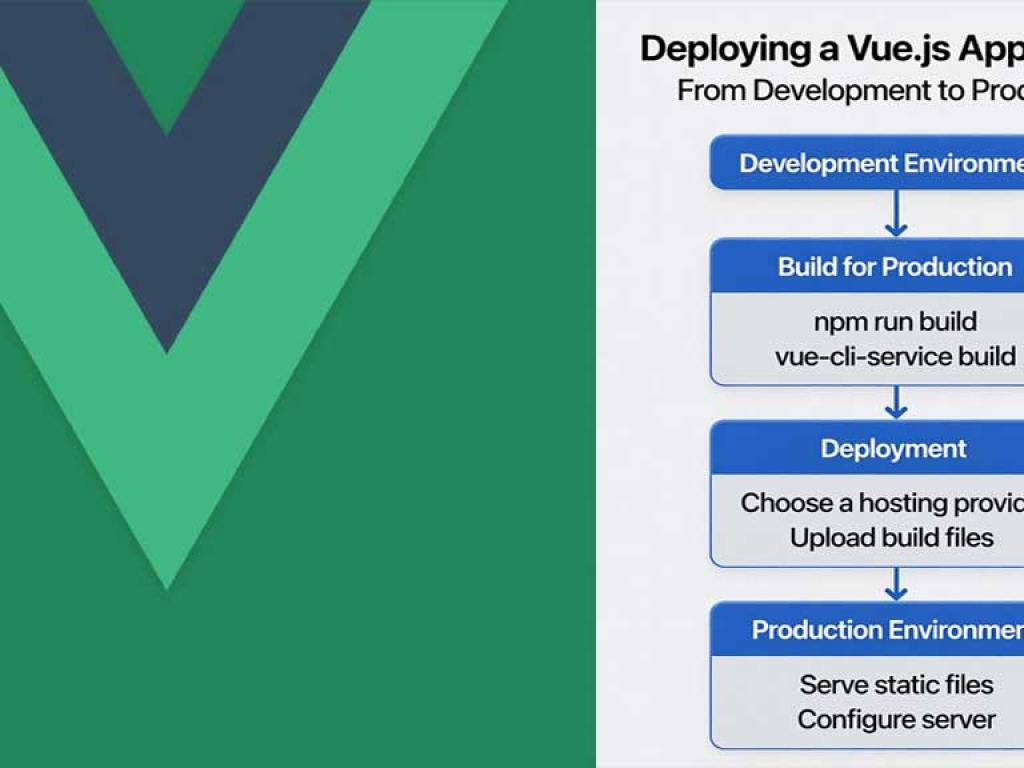
Deploying a Vue.js app is more than running npm run build and dragging files to a server. A production deployment requires thinking about build configuration, environment variables, hosting target, asset delivery, caching, security headers, CI/CD, monitoring, and rollback strategies.
Table of contents [Show]
- 1. Prepare your Vue app for production
- 2. Choose a hosting strategy
- 3. Example: Deploy a static Vite-based Vue app to Netlify (step-by-step)
- 4. Example: Deploy to Vercel
- 5. Example: AWS S3 + CloudFront (static site with CDN)
- 6. Example: Docker + Nginx to serve SPA (full example)
- 7. CI/CD pipeline examples
- 8. Production considerations & best practices
- 9. Troubleshooting checklist
- 10. Full real-world minimal example summary
- Closing advice & checklist
1. Prepare your Vue app for production
Before you deploy, prepare the app so the bundle is optimized and predictable.
1.1 Use the production build
Always run the production build. For Vite or Vue CLI:
# Vite (Vue 3)
npm run build

# Vue CLI
npm run build
Production build minifies code, removes dev-only warnings and enables tree-shaking.
1.2 Set environment variables
Use .env files for build-time configuration. Never commit secrets.
# .env.production
VITE_API_BASE_URL=https://api.example.com
VITE_SENTRY_DSN=https://your-sentry-dsn
Vite uses variables prefixed with VITE_. Vue CLI uses process.env.VUE_APP_*. For runtime secrets (tokens, keys you must hide) consider a server-side proxy or server-rendered approach; do not bake secrets into your static bundle.
1.3 Optimize assets & code splitting
Leverage lazy-loading and code splitting so initial page load is small.
// dynamic import example (lazy loaded route)
const LazyPage = () => import('./views/LazyPage.vue')
Also compress and optimize images (WebP), and resize images for multiple device sizes.
1.4 Service Worker and PWA (optional)
If you build a PWA, configure a service worker and cache strategy carefully to avoid serving stale app shell. Test updates to ensure the new service worker properly handles version changes.
2. Choose a hosting strategy
Your hosting choice depends on whether the app is a static SPA, server-side rendered (SSR) app, or requires custom server logic.
2.1 Static SPA hosting (fast & cheap)
Good for single-page apps built with Vue CLI or Vite: the build outputs static files you can host on a CDN or static host.
- Popular options: Netlify, Vercel, GitHub Pages, Firebase Hosting, Surge.sh, AWS S3 + CloudFront.
- Pros: Simple, cost-effective, CDN-backed.
2.2 Server-side rendering (SSR) hosting
If you're using Nuxt or Vue SSR for SEO and fast TTFB, your server will need to run Node (or use serverless functions). Hosting options include Vercel, Render, Heroku, DigitalOcean App Platform, AWS ECS / Fargate.
2.3 Containerized apps & custom backends
Use Docker when your app needs custom server logic, multiple services, or you want consistent runtime environments. Deploy containers to AWS ECS/EKS, Google Cloud Run, Azure Container Instances, or any Kubernetes cluster.
2.4 Edge deployment
Edge platforms (Cloudflare Pages, Vercel Edge functions) can run functions closer to users for lower latency. They are great for SSR at the edge or for running authentication checks.
3. Example: Deploy a static Vite-based Vue app to Netlify (step-by-step)
This is a concrete, common flow for SPAs.
3.1 Build configuration
// package.json (scripts)
{
  "scripts": {
    "dev": "vite",
    "build": "vite build",
    "preview": "vite preview"
  }
}
3.2 Add _redirects for client-side routing
Netlify needs a redirect rule so SPA routes point to index.html.
# public/_redirects
/*    /index.html   200
3.3 Connect repo to Netlify
- Push code to GitHub/GitLab/Bitbucket.
- Create a new site on Netlify and connect your repo.
- Set build command:
npm run buildand publish directory:dist. - Add environment variables in Netlify UI (VITE_API_BASE_URL, etc.).
3.4 Deploy
Netlify will build and deploy on each push. You can customize build image and cache directories to speed builds.
4. Example: Deploy to Vercel
- Connect your repo to Vercel.
- Vercel auto-detects Vite and uses
npm run build. Set Environment Variables in Vercel dashboard. - For SPA routing you may need a
vercel.jsonwith rewrites:
// vercel.json
{
  "rewrites": [{ "source": "/(.*)", "destination": "/index.html" }]
}
5. Example: AWS S3 + CloudFront (static site with CDN)
This is a production-grade option with fine control over caching and custom domains.
5.1 Build
npm run build
# contents appear in dist/
5.2 Upload to S3
aws s3 sync dist/ s3://your-bucket-name --delete5.3 CloudFront & caching
Create a CloudFront distribution pointing to the S3 bucket as origin. Use cache behaviors:
- /index.html — Cache TTL low (e.g., 0-60s) or set Cache-Control: no-cache to allow quick updates.
- Static assets (JS/CSS/images) — Long TTL with content-hash filenames for cache-busting.
5.4 Invalidate CloudFront on deploy (optional)
aws cloudfront create-invalidation --distribution-id YOUR_ID --paths "/*"Better: set Cache-Control on index.html to no-cache and use content-hashed filenames for other assets so invalidations are rarely needed.
6. Example: Docker + Nginx to serve SPA (full example)
When your org wants a containerized artifact, build a Docker image that runs Nginx and serves the static build.
6.1 Dockerfile
# Dockerfile
FROM node:18 AS build
WORKDIR /app
COPY package*.json ./
RUN npm ci
COPY . .
RUN npm run build

FROM nginx:stable-alpine
COPY --from=build /app/dist /usr/share/nginx/html
# Optional: custom nginx.conf
COPY nginx.conf /etc/nginx/conf.d/default.conf
EXPOSE 80
CMD ["nginx", "-g", "daemon off;"]
6.2 nginx.conf (SPA routing & security headers)
server {
  listen 80;
  server_name _;
  root /usr/share/nginx/html;

  add_header X-Frame-Options "DENY";
  add_header X-Content-Type-Options "nosniff";
  add_header Referrer-Policy "no-referrer-when-downgrade";
  add_header Content-Security-Policy "default-src 'self'; script-src 'self' 'unsafe-inline'";

  location / {
    try_files $uri $uri/ /index.html;
  }

  location ~* \.(js|css|png|jpg|jpeg|gif|svg|webp)$ {
    expires 1y;
    add_header Cache-Control "public, max-age=31536000, immutable";
  }

  location = /index.html {
    add_header Cache-Control "no-cache, must-revalidate";
  }
}
6.3 Build & run
docker build -t my-vue-app:latest .
docker run -p 80:80 my-vue-app:latest
This pattern packages the app as a single artifact for orchestration systems.
7. CI/CD pipeline examples
7.1 GitHub Actions for static deploy (to S3 + CloudFront)
# .github/workflows/deploy.yml
name: Build and Deploy
on:
  push:
    branches: [ main ]

jobs:
  build-deploy:
    runs-on: ubuntu-latest
    steps:
      - uses: actions/checkout@v4
      - name: Use Node.js
        uses: actions/setup-node@v4
        with:
          node-version: 18
      - name: Install dependencies
        run: npm ci
      - name: Build
        run: npm run build
      - name: Sync to S3
        uses: jakejarvis/s3-sync-action@v0.6.0
        with:
          args: --delete
        env:
          AWS_S3_BUCKET: ${{ secrets.AWS_S3_BUCKET }}
          AWS_ACCESS_KEY_ID: ${{ secrets.AWS_ACCESS_KEY_ID }}
          AWS_SECRET_ACCESS_KEY: ${{ secrets.AWS_SECRET_ACCESS_KEY }}
          AWS_REGION: 'us-east-1'
      - name: Invalidate CloudFront
        run: |
          aws cloudfront create-invalidation --distribution-id ${{ secrets.CLOUDFRONT_ID }} --paths "/*"
        env:
          AWS_ACCESS_KEY_ID: ${{ secrets.AWS_ACCESS_KEY_ID }}
          AWS_SECRET_ACCESS_KEY: ${{ secrets.AWS_SECRET_ACCESS_KEY }}
7.2 GitHub Actions for Docker image push
# push docker image to registry
- name: Build Docker image
  run: docker build -t ghcr.io/${{ github.repository }}/my-vue-app:${{ github.sha }} .

- name: Log in to GitHub Container Registry
  uses: docker/login-action@v2
  with:
    registry: ghcr.io
    username: ${{ github.actor }}
    password: ${{ secrets.GITHUB_TOKEN }}

- name: Push image
  run: docker push ghcr.io/${{ github.repository }}/my-vue-app:${{ github.sha }}
8. Production considerations & best practices
8.1 Security headers & CSP
Set strong security headers (X-Frame-Options, X-Content-Type-Options, Referrer-Policy) and a Content Security Policy. Test CSP in report-only mode first to avoid breaking functionality.
8.2 Use TLS (HTTPS) everywhere
Configure HTTPS with modern TLS ciphers and HSTS. Most hosting providers offer managed TLS.
8.3 Runtime configuration & secrets
Prefer injecting runtime configuration via environment variables on the server or via server-rendered small JSON file fetched at runtime. This avoids building multiple environment-specific artifacts.
// runtime-config.json served by CDN or rooted at /runtime-config.json
{
  "API_BASE_URL": "https://api.example.com"
}
8.4 Monitor & alert
Add error monitoring (Sentry, LogRocket), performance monitoring (New Relic, Datadog), and uptime checks. Configure alerts for errors and high latency.
8.5 Rollbacks & deployment strategies
Use versioned artifacts and immutable deployments. For critical apps, implement blue-green or canary deployments to minimize risk. On static deploys, keep prior builds available or use the hosting provider's rollback features.
8.6 Cache busting
Use hashed filenames (default in modern bundlers) to let CDNs cache assets long-term while allowing new builds to update clients immediately.
8.7 SEO & SSR
If SEO matters, prefer SSR (Nuxt, or Vue SSR) or pre-rendering. Hosting SSR requires a Node process or serverless functions. Many hosting providers offer serverless Node support for SSR apps.
9. Troubleshooting checklist
- Blank page on production: Check console for 404 on chunks — often due to wrong
baseorpublicPathconfiguration. For Vite usebaseinvite.config.js. - Routing issues (refresh routes 404): Ensure your host rewrites to
index.htmlfor SPA routing. - Assets not updating: Check caching headers for
index.html(set short TTL) and ensure content-hashed names for static assets. - Environment variables missing: Confirm build-time env variables are set in CI / hosting provider. For runtime-only values, use a runtime config JSON endpoint.
- Service worker serving stale app: Update SW lifecycle to notify users of new version; test update flows.
10. Full real-world minimal example summary
Below is a realistic set of files and commands to deploy a Vite Vue app to S3+CloudFront using GitHub Actions (this is a concise pointer to earlier, full snippets are above):
Key files
package.json (scripts)
npm run build -> vite build

Dockerfile -> optional containerization
nginx.conf -> SPA nginx server example
.github/workflows/deploy.yml -> CI to build & sync to S3 & invalidate CloudFront
.env.production -> VITE_ variables stored in CI secrets
Deploy flow
- Push to
mainbranch. - GitHub Actions runs build.
- Artifacts synced to S3.
- CloudFront cache invalidated or index.html set to no-cache.
- Site served over HTTPS via CloudFront custom domain.
Closing advice & checklist
Deploying to production is part engineering and part discipline. Here’s a short final checklist before you click deploy:
- Production build succeeds locally:
npm run build - Environment variables properly configured in CI/host
- Routing handled (rewrites for SPA or SSR configured)
- Security headers & HTTPS enabled
- Assets optimized and hashed
- Monitoring & error tracking configured
- Rollback or previous build snapshot available


